
Probably the biggest and most involved feature yet to be added to pre-release LIDA is the ability – and the instructions on how – to import an existing music library data file.
Of course, we want to automate this import process as much as possible, but because of the very many different ways organizations keep this data, a totally automated data import procedure is impossible.
What this means is LIDA users who want to import their own music library into LIDA will need to do some preparation work first, to put their information into a format that LIDA can swallow (import) without choking.
From reading several (at least three) extensive online forum conversations about “How do you keep your library data?” we have concluded that most organizations keep their music library in a spreadsheet, in a database, or in a text or word processing document. The unscientific impression is that the great majority use a spreadsheet, a small percentage use a database, and a very few use a text or word document.
Therefore, these are the formats on which we will focus development of the import capability and tutorials.
Sadly, some organizations keep this data – but in a stunningly disorganized way. As an example here is a screenshot of some actual data that was submitted to me for attempted import into LIDA:
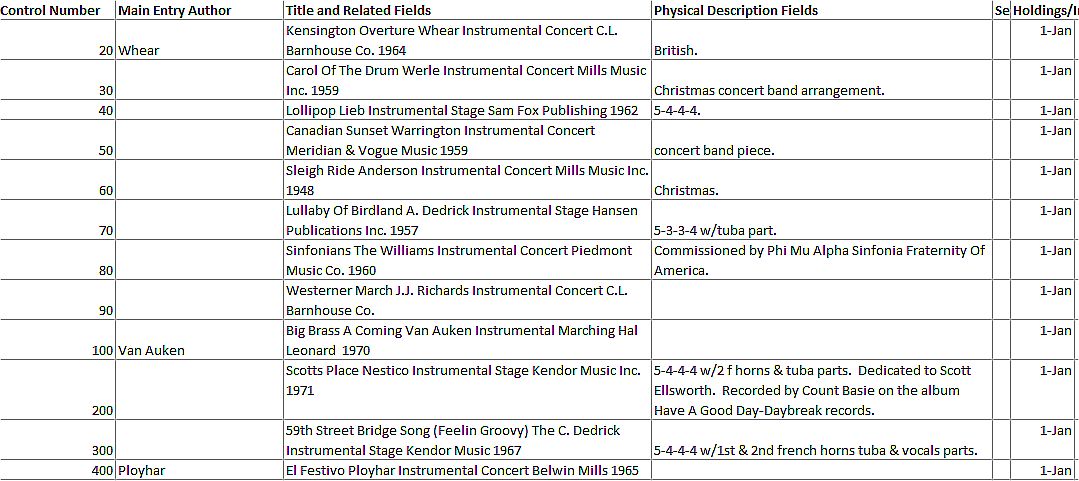
As you can see – you may need to click on the image to see it larger – the data in this listing is mixed, with many different categories of data contained in the second and third fields (columns).
Importing data formatted like this requires some advanced database skills, or hiring our Data Importing Service. No, we are not trying to gouge or milk our LIDA users, but we know not everyone has the required skillset, and we want everyone to be able to get their existing data imported if they wish.
If your existing library data is not well-organized, and you’re on a tight budget, and if you have only a few hundred listings, you might consider manually entering your library.
However, most LIDA users, we believe, will have their data in a spreadsheet or database, so this is where we will focus our import automation development efforts.Some LIDA users will have their library data in a Microsoft Access database, and the import procedure for this, while paralleling the other import methods, will be easier and more straightforward, so there will be a separate tutorial and probably import route for this data.
All other storage methods, whether from a spreadsheet, a non-Access database, or a text file, will need to export their data to a CSV (comma-separated value) file, from which the import process will be the same, regardless of the source.
At our current stage if Import Feature Concept Development, here is an outline of what the import procedure will look like:
- Make a Copy of your Existing Data. This is important so you do not corrupt your only copy of your data, in case your import doesn’t work, or you mess it up.
- Add Column Heads to your Data. For this, you need to add or change existing column heads (a.k.a. field names) so they are identical to the field names in the LIDA t_Listings table. The field names and data types will be provided in a separate document, and this step will be covered in a tutorial.
- Ensure Your Data is the Proper Type. This will be explained in a tutorial, but the upshot here is you don’t want alphabetic characters where LIDA expects numbers, and vice-versa.
- Perform the Automated Import. We are confident that if your library data is well-organized, you will be able to import most of it into LIDA smoothly. You won’t fill all the LIDA fields, and you well may have data fields that don’t import into LIDA. But the automated import process should get you most of the way there.
- Edit Your Data in LIDA. Inevitably, there will be imported data that does not display the way you want it to. In this final step, you go through all your records and fix this. Yes, even if you have more than 7,000 records, this is advisable. But you can do it just a few at a time, and come back and get another batch later.
As you probably already know, proper concept development – such as this – before beginning to build the actual machinery of the import feature will make the building of that feature much faster and more reliable when it’s done.
We will keep you updated on the progress of this feature’s development as we go, and as always, your comments and feedback and suggestions are welcome.