
Building the Events Management Feature in LIDA has been one of the most involved sub-projects in this entire LIDA construction effort. The reason for this is the amount of foundation work that had to be done before we could get to the pieces the LIDA user will actually use.
In today’s posting, I will go over with you many of the pieces of this sub-project, with a progress report (completed or still to do) on each. For brevity in this post, let’s refer to the LIDA Events Manager Feature as the LEMF.
Also, just to keep things clear, when we refer to a “form” in this post (and with most things LIDA), we mean a screen on your LIDA application, whether that screen fills up your monitor or only part of it. Basically, a FORM is intended for display on your computer screen, and a REPORT is intended for output outside of LIDA, such as to your printer or export to be used in another program.
The Completed Elements:
The first phase of this sub-project was the concept development of the data structure. Since LIDA is built to run on a database engine, the data structure is kept in tables, so we had to figure out which tables we needed, what data goes in to each table, and how those tables relate to each other.
For those of you who are interested, here is the (hopefully) final layout of our table structure and their relationships:

Once we had the concept of the table structure, we then had to build the tables, then we had to build the forms to allow users to enter data into each table, and manipulate that data, then we also had to build the menuing form to allow the users to GET to each of the forms above. And then we had to put a button on the Main Menu screen to allow users to get to the LEMF Menu form.
Whew! See what I mean about this being one of the most involved sub-projects of the LIDA building effort?

Main Menu Button


As you can see in the image above, the user can click on either of these buttons to add whichever listing is selected on the All Listings screen or the Query Results screen to add that listing to the current default event, or the current default season.
If the “Confirm each Add” checkbox is checked, then after clicking one of the buttons, the user will see a confirmation dialog, like this:

For this example, I selected a listing with a very long title, so you can see how long titles are displayed in the confirmation dialog.
However, we realize that if you are adding many listings at a time, you might not want to click “OK” on the dialog box with every addition, so we provided the ability to turn off the confirmation dialog by unchecking the box beside the buttons.
All that is done right now and ready to go.
This means that users have the ability to enter any number of seasons, venues, event types, and events, and to associate any event with an event type and a venue, and to add any number of listings to any event or any season.
Elements Yet to Be Done (as of mid Feb 2020)
We have three MAJOR components of the LEMF yet to do: two forms, and the entire REPORTING capability.
The first form is the form to allow users to edit a specific event’s repertoire.
On this form, the user will be able to add listings, delete listings, and reorder the listings into any sequence desired. The user will also be able to add “sub-info” to any listing, such as guest conductor or featured player(s), like this:
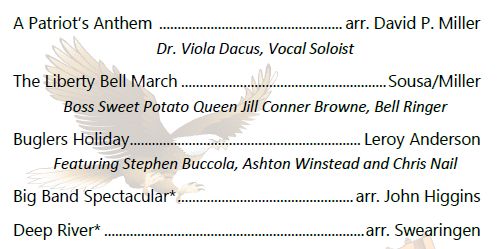
The image above is from one of my group’s previous programs, and is shown merely to illustrate the concept of “sub-info” in an event repertoire listing.
However, it also illustrates the concept of what we want one of our report output formats to look like, which is a file suitable for using in your program designer’s software, such as MS Publisher or Adobe InDesign.
The second form we have yet to build is the form to edit a SEASON’s repertoire.
We understand some people will never use this capability, while others will use it regularly. That’s fine. We operate on the “whatever floats your boat” philosophy.
When editing a Season’s repertoire, the user will be able to add listings, delete listings, and assign them to the default event, or to any other event on the list of events. Once a listing on this form is assigned to an event, that listing will show to which event the listing was assigned.
The final item we need to put into place to complete the LEMF project is to give it REPORTING capabilities.By this, we mean the ability to produce output suitable for export and/or printing.
We have not completed concept development on this phase of the project yet, and would be happy to have all your thoughts on what we need to provide. So far, our two principal ideas are to provide output suitable for including in a concert program (per the image above), and output suitable for reporting to performance royalties management agencies, such as ASCAP, BMI, and SESAC, or through the auspices of the Association of Concert Bands.
The discussion of various output formats of the LEMF is one I expect to be very involved, and is probably best saved for another session, perhaps on our Discussion Forums.
That’s it for today, but now you know the status of the LIDA Event Management Feature, what’s done, and what is yet to do.
Leave us a comment below (for general-for-everyone comments on this post), email me directly if you have questions or issues, or head on over to the discussion forum to talk about what you’re thinking would be good to give the LEMF in the Output Format (reporting) area.
Take care, all.
That is all looking very nice!